基础数据类型
数据类型与区别
- 基本数据类型
- Number
- String
- Boolean
- Null
- Undefined
- Symbol
- 引用数据类型
- Object
- Function
类型检测方案
- typeof
console.log(typeof 1); // number
console.log(typeof true); // boolean
console.log(typeof "mc"); // string
console.log(typeof Symbol); // function
console.log(typeof Symbol()); // symbol
console.log(typeof function () {}); // function
console.log(typeof console.log()); // undefined
console.log(typeof []); // object
console.log(typeof {}); // object
console.log(typeof null); // object
console.log(typeof undefined); // undefined缺点:不能将 Object、Array 和 Null 区分,都返回 object
- instanceof
console.log(1 instanceof Number); // false
console.log(true instanceof Boolean); // false
console.log("str" instanceof String); // false
console.log([] instanceof Array); // true
console.log(function () {} instanceof Function); // true
console.log({} instanceof Object); // true缺点:Number,Boolean,String 基本数据类型不能判断
- Object.prototype.toString.call()
var toString = Object.prototype.toString;
console.log(toString.call(1)); //[object Number]
console.log(toString.call(true)); //[object Boolean]
console.log(toString.call("mc")); //[object String]
console.log(toString.call([])); //[object Array]
console.log(toString.call({})); //[object Object]
console.log(toString.call(function () {})); //[object Function]
console.log(toString.call(undefined)); //[object Undefined]
console.log(toString.call(null)); //[object Null]精准判断数据类型
类型包含方法总结
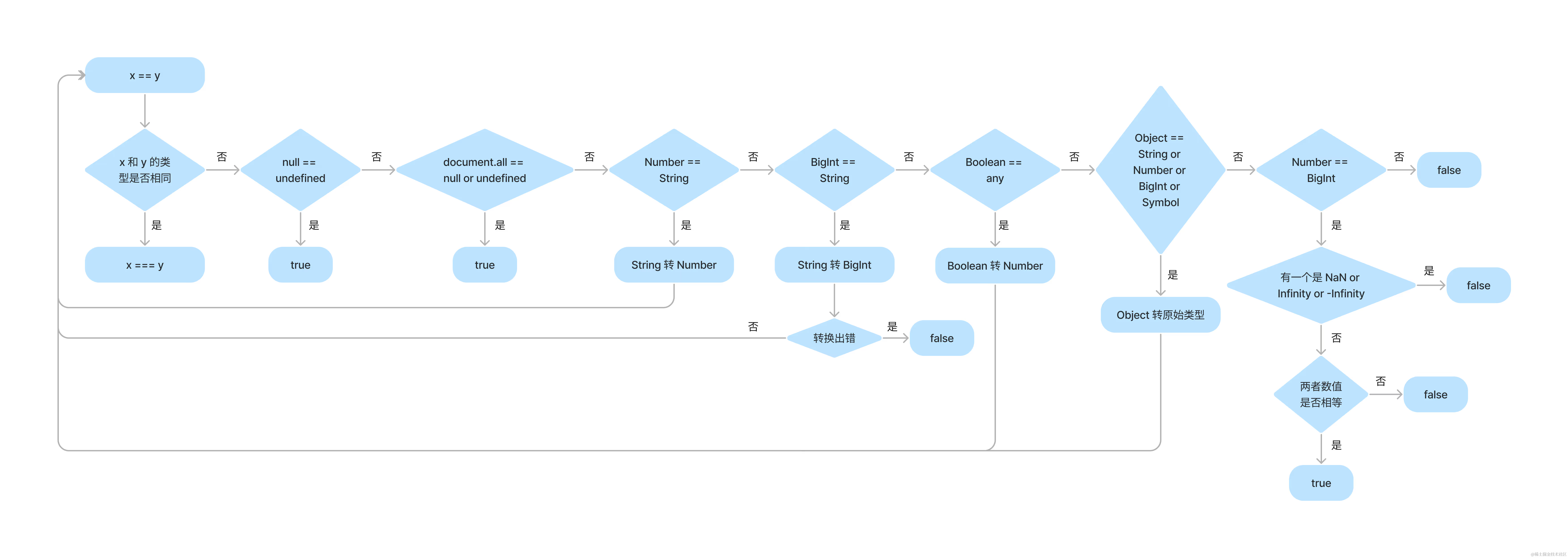
隐式转换
Number
toExponential
把对象的值转换成指数计数法
// toExponential
const exponentialNum = 5.56789;

// 可传入精度参数
console.log("toExponential方法", exponentialNum.toExponential(4));

// toExponential方法 5.5679e+0toFixed
对数值进行最近一位整数的四舍五入
// toFixed
const fixedNum = 5.5;

// 可传入精度参数
console.log("toFixed方法", fixedNum.toFixed());
// toFixed方法 6

console.log("toFixed方法", fixedNum.toFixed(10));
// toFixed方法 5.5000000000toLocaleString
如字面意思,转换为当地字符串 MDN——Number.prototype.toLocaleString()
toPrecision
设置精度的同时进行四舍五入
// toPrecision
const precisionNum = 5.56789;
console.log("toPrecision", precisionNum.toPrecision(3));
// toPrecision 5.57
toString
将数字转换为字符串
// toString
const stringNum = 3.34567;
console.log("toString", stringNum.toString());
console.log(typeof stringNum.toString());

// toString 3.34567
// stringvalueOf
返回给定参数的原生 Number 对象值
// valueOf
const valueNum = 2.23456;
console.log("valueOf", valueNum.valueOf());

// valueOf 2.23456延伸
// 1.只保留整数部分(丢弃小数部分)
parseInt(5.1234);// 5
// 2.向下取整(<= 该数值的最大整数)和parseInt()一样
Math.floor(5.1234);// 5
// 3.向上取整(有小数,整数就+1)
Math.ceil(5.1234);

// 4.四舍五入(小数部分)
Math.round(5.1234);// 5
Math.round(5.6789);// 6
// 5.绝对值
Math.abs(-1);// 1
// 6.返回两者中的较大值
Math.max(1,2);// 2
// 7.返回两者中的较小值
Math.min(1,2);// 1
// 随机数(0-1)
Math.random();
String
length 是属性而不是方法
anchor
已被废弃 用于创建 HTML 锚。
<script type="text/javascript">

var txt="Hello world!"
document.write(txt.anchor("myanchor"))

</script>

// 输出结果
<a name="myanchor">Hello world!</a>at
可以使用负数 index,类似于 python 的倒序索引 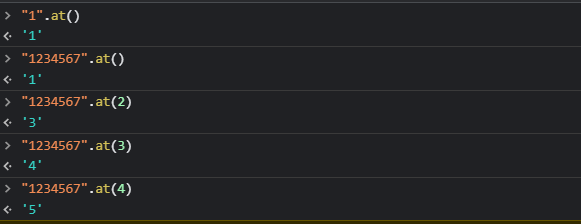
const testString = "Harrison"
// at
console.log("at()",testString.at(2)) # r
console.log("at()",testString.at(-2)) # obig
已被废弃 把字符串显示为大号字体
blink
已被废弃 为字符串添加闪烁效果
bold
已被废弃 将字符串加粗展示
charAt
从一个字符串中返回指定的字符。
const testString = "Harrison"
// charAt
// index为大于等于0的正整数
console.log("charAt()",testString.charAt(2)) # r
console.log("charAt()",testString.charAt(-2)) #
charCodeAt
返回 0 到 65535 之间的整数,表示给定索引处的 UTF-16 代码单元
const testString = "Harrison";
// charCodeAt
console.log("charCodeAt", testString.charCodeAt(2));
// 打印第三个字母r在ascii码表里的值:114
console.log("charCodeAt", testString.charCodeAt(-2));

// charCodeAt 114
// charCodeAt NaNcodePointAt
// codePointAt
console.log("codePointAt", testString.codePointAt(2));
console.log("ABC".codePointAt(1)); // 66
console.log("\uD800\uDC00".codePointAt(0)); // 65536
console.log("XYZ".codePointAt(42)); // undefinedconcat
将一个或多个字符串与原字符串连接合并,形成一个新的字符串并返回
let hello = "Hello, ";
console.log(hello.concat("Kevin", ". Have a nice day."));
// Hello, Kevin. Have a nice day.

let greetList = ["Hello", " ", "Venkat", "!"];
"".concat(...greetList); // "Hello Venkat!"

"".concat({}); // [object Object]
"".concat([]); // ""
"".concat(null); // "null"
"".concat(true); // "true"
"".concat(4, 5); // "45"endsWith
判断当前字符串是否是以另外一个给定的子字符串“结尾”的,根据判断结果返回 true 或 false。
const str1 = "Cats are the best!";

console.log(str1.endsWith("best", 17));
// expected output: true

const str2 = "Is this a question";

console.log(str2.endsWith("?"));
// expected output: falsefixed
已被废弃
fontcolor
已被废弃
fontsize
已被废弃
fromCharCode
返回由指定的 UTF-16 代码单元序列创建的字符串
console.log(String.fromCharCode(189, 43, 190, 61));
// expected output: "½+¾="fromCodePoint
返回使用指定的代码点序列创建的字符串
console.log(String.fromCodePoint(9731, 9733, 9842, 0x2f804));
// expected output: "☃★♲你"includes
判断一个字符串是否包含在另一个字符串中,返回 boolean 值
indexOf
返回调用它的 String 对象中第一次出现的指定值的索引,从 fromIndex 处进行搜索。如果未找到该值,则返回 -1。
const paragraph =
  "The quick brown fox jumps over the lazy dog. If the dog barked, was it really lazy?";

const searchTerm = "dog";
const indexOfFirst = paragraph.indexOf(searchTerm);

console.log(
  `The index of the first "${searchTerm}" from the beginning is ${indexOfFirst}`
);
// expected output: "The index of the first "dog" from the beginning is 40"italics
已被废弃
lastIndexOf
link
已被废弃
localeCompare
match
返回一个字符串匹配正则表达式的结果。
const paragraph = "The quick brown fox jumps over the lazy dog. It barked.";
const regex = /[A-Z]/g;
const found = paragraph.match(regex);

console.log(found);
// expected output: Array ["T", "I"]matchAll
normalize
padEnd
用一个字符串填充当前字符串(如果需要的话则重复填充),返回填充后达到指定长度的字符串。从当前字符串的末尾(右侧)开始填充。
const testString = "Harrison";
// padEnd
console.log("padEnd", testString.padEnd(15, "test"));
// padEnd Harrisontesttes

// 第一个参数是需要补充到的长度,若已到该长度则不补充,
// 若未到达,以第二个参数循环补充至所需长度,不设置则
// 为空格。padStart
用另一个字符串填充当前字符串(如果需要的话,会重复多次),以便产生的字符串达到给定的长度。从当前字符串的左侧开始填充。
const testString = "Harrison";
// padStart
console.log("padStart", testString.padStart(15, "test"));
// padStart testtesHarrison
// 参考padEndrepeat
构造并返回一个新字符串,该字符串包含被连接在一起的指定数量的字符串的副本。
"abc".repeat(-1); // RangeError: repeat count must be positive and less than inifinity
"abc".repeat(0); // ""
"abc".repeat(1); // "abc"
"abc".repeat(2); // "abcabc"
"abc".repeat(3.5); // "abcabcabc" 参数count将会被自动转换成整数.
"abc"
  .repeat(1 / 0)(
    // RangeError: repeat count must be positive and less than inifinity

    { toString: () => "abc", repeat: String.prototype.repeat }
  )
  .repeat(2);
//"abcabc",repeat是一个通用方法,也就是它的调用者可以不是一个字符串对象.replace
replaceAll
search
slice
方法提取某个字符串的一部分,并返回一个新的字符串,且不会改动原字符串。
const str = "The quick brown fox jumps over the lazy dog.";

console.log(str.slice(31));
// expected output: "the lazy dog."

console.log(str.slice(4, 19));
// expected output: "quick brown fox"

console.log(str.slice(-4));
// expected output: "dog."

console.log(str.slice(-9, -5));
// expected output: "lazy"small
已被废弃
split
startsWith
strike
已被废弃
sub
已被废弃
substr
已被废弃
substring
sup
已被废弃
toLocaleLowerCase
根据任何指定区域语言环境设置的大小写映射,返回调用字符串被转换为小写的格式。
const testString = "Harrison";

// toLocaleLowerCase
console.log("toLocaleLowerCase", testString.toLocaleLowerCase());
// toLocaleLowerCase harrisontoLocaleUpperCase
根据本地主机语言环境把字符串转换为大写格式,并返回转换后的字符串
const testString = "Harrison";

// toLocaleUpperCase
console.log("toLocaleUpperCase", testString.toLocaleUpperCase());
console.log("------------------------------------");

// toLocaleUpperCase HARRISONtoLowerCase
返回一个新的字符串,表示转换为小写的调用字符串。、
const testString = "Harrison";
// toLowerCase
console.log("toLowerCase", testString.toLowerCase());
console.log("------------------------------------");

// toLowerCase harrisontoString
toUpperCase
trim
trimEnd
trimLeft
trimRigth
trimStart
valueOf
Symbol
Array
at
concat
copyWithin
entries
every
fill
filter
find
findIndex
flat
flatMap
forEach
Object
hasOwnProperty
isPrototypeOf
propertyIsEnumerable
toLocaleString
toString
valueOf
Function
Proxy
学习javascript 函数式编程实践指南中,了解“不可变数据”概念时,作者从 immutable 讲到 immer,在讲解 immer 中涉及到 javascript 里的 Proxy 知识,关于 Proxy 的概念可查看MDN
AST
AST 在线解析https://zhuanlan.zhihu.com/p/102385477
babel 的转换机制就是借用 AST 来实现的 
常用方法
字符串 reverse
js 中汉字转 Unicode 编码
function ch2Unicdoe(str) {
  if (!str) {
    return;
  }
  var unicode = "";
  for (var i = 0; i < str.length; i++) {
    var temp = str.charAt(i);
    if (isChinese(temp)) {
      unicode += "\\u" + temp.charCodeAt(0).toString(16);
    } else {
      unicode += temp;
    }
  }
  return unicode;
}

function isChinese(s) {
  return /[\u4e00-\u9fa5]/.test(s);
}构造随机 IP
new Array(4)
  .fill(0)
  .map(() => parseInt(String(Math.random() * 255), 10))
.join(".");import.meta
是一个给 JavaScript 模块暴露特定上下文的元数据属性的对象。它包含了这个模块的信息,比如说这个模块的 URL import.meta
有用的第三方包
patch-package
可以通过改包对包源码修改,并持久化作用于工程项目中,主要原理是通过 git diff 去实现。用来解决一些满足不了需求的样式修改。建议将需要修改的源码包版本写死。
手把手教你使用 patch-package 给 npm 包打补丁
npx patch-package node_modules

// 然后重启项目 npm startpubsub-js
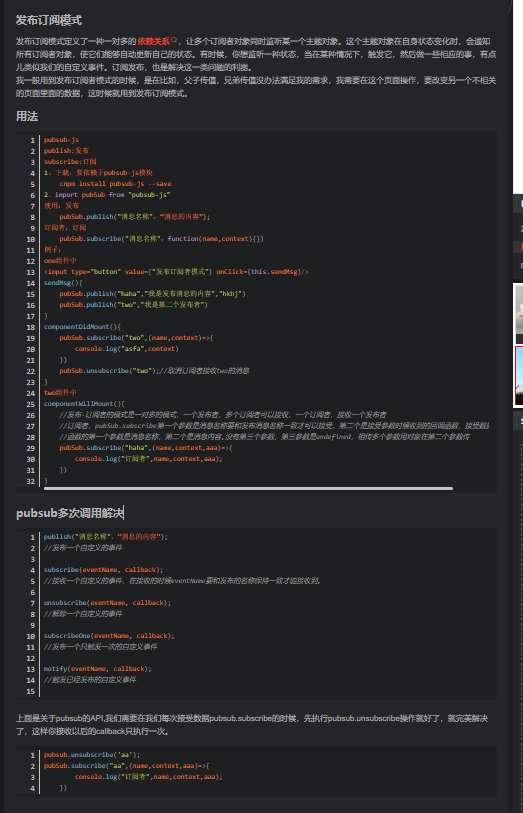
发布订阅模式 https://blog.csdn.net/qq_40657321/article/details/107204486