浏览器 理论知识点
跨域
只有协议、域名、端口都相同才算同源
前端路由
- hash 模式
- history 模式
浏览器缓存
失效策略划分
- 强缓存
- 协商缓存
- 启发式缓存
- 响应报头中没有 max-age(s-maxage) 和 expires 这两个关键的字段值时,会触发启发式缓存
date: Thu, 02 Sep 2021 13:28:56 GMT
age: 10467792
cache-control: public
last-modified: Mon, 26 Apr 2021 09:56:06 GMT缓存新鲜度 = max(0,(date - last-modified)) * 10%
-- 根据响应报头中 date 与 last-modified 值之差与 0 取最大值后取其值的百分之十作为缓存时间。缓存位置划分
- Service Worker Cache
- Memory Cache
- Disk Cache
- Push Cache
存储型缓存
- cookie
- localStorage、sessionStorage
- IndexedDB
当用户从客户端界面填写账号密码点击登陆后,会讲数据发送给服务器进行验证
如果服务端判断用户账号存在且密码正确则像客户端返回并颁发有效的 token 信息,校验失败则返回错误信息,拒绝登录
一旦唯一并有效的 token 信息颁发到客户端,后续的所有需经过登录校验的接口请求客户端都需要携带 token 信息 发送给服务端判断请求的有效性,因此 token 在客户端的存储及使用是必不可少的一环
常见的客户端存储 token 信息有
- 服务端自动植入
- 前端手动存储
服务端自动植入
服务端登录接口可以在返回前端的响应报头中设置首部字段 set-cookie 来将 token 信息植入浏览器 cookie 中
set-cookie 指令值包含了必选项 cookie-name=cookie-value 值和名的形式,同时还包括了可选项 Path(路径)、Domain(域名)、Max-Age(有效时间)等,以分号分隔。
然后前端调用任何同域下的借口时,浏览器会自动将网站的 cookie 值附加在请求头中传给后端进行校验,而前端则不需要关系 token 的存取问题。
封装 Cookie 操作库 —— js-cookie
import Cookies from "js-cookie";

// 存储 Cookie
Cookies.set("name", "juejin", { domain: "juejin.cn" });

// 读取 Cookie
Cookies.get("name");

// 删除 Cookie
Cookies.remove("name");前端手动存储
相比服务端自动植入,前端存储的方式不受限于浏览器环境,比如像 APP 或小程序等一些没有浏览器 cookie 的环境下也可以使用该种方式。
这种方式在服务器校验登录信息成功后,讲 token 信息以响应体的方式返回给前端
而前端则在获取到 token 信息后用存储方法将数据持久化缓存起来,并在退出后手动清除。
import axios from "axios";

export const http = (params) => {
  let instance = axios.create({
    baseURL: "https://juejin.cn",
  });

  let token = localStorage.getItem("token"); // 从缓存中获取对应 name 值

  return instance({
    url: "/xxx/xxx",
    method: "post",
    data: params,
    headers: {
      "x-token": token, // 前端手动设置自定义 token 响应头
    },
  });
};实用 API
dom元素设置自定义属性
在HTML DOM中,data-*属性用于存储私有的自定义数据。当在DOM元素上设置data-*属性时,如data-component-id,浏览器会自动将这个属性名转换为驼峰命名法,并且把data-前缀去掉。因此,data-component-id会映射为dataset.componentId。
这个转换过程遵循以下规则:
- 所有连字符(
-)都会被去除。 - 每个连字符后面的字符都会转换为大写形式。
data-前缀会被去掉。
例如,如果我们有一个元素如下所示:
<div id="myComponent" data-component-id="12345"></div>我们可以通过JavaScript访问这个属性:
const componentId = document.getElementById('myComponent').dataset.componentId; // "12345"其他示例包括:
data-toggle="collapse"映射为dataset.toggle。data-user-id="1001"映射为dataset.userId。
这种映射方式允许开发者以一种声明式的方式来存储和访问与元素相关的数据,而不需要直接操作DOM属性。
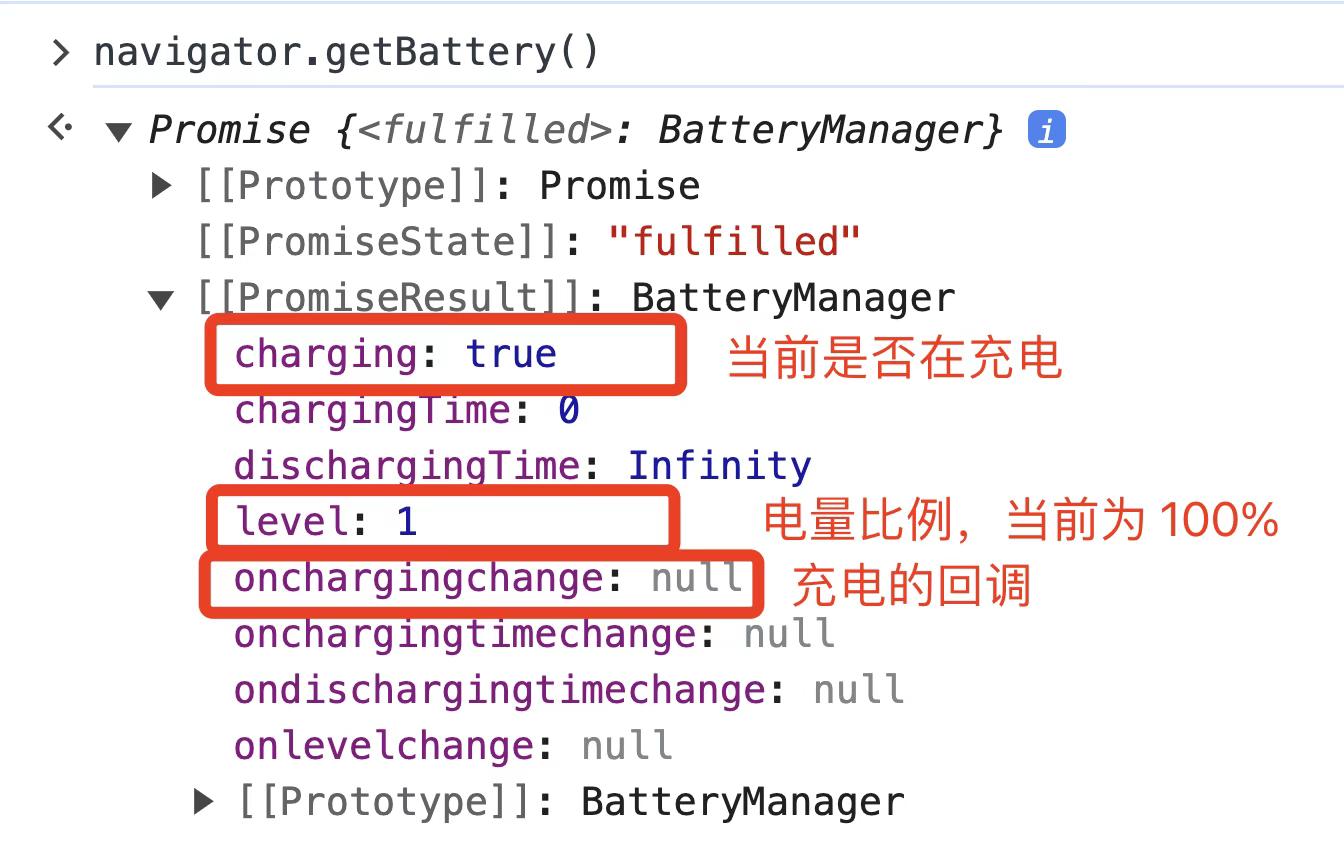
window.navigator.getBattery()
获取「电脑的充电信息」,电量变化会触发「chargingchange 事件」
5个实用observer
IntersectionObserver
IntersectionObserver 可以监听一个元素和可视区域相交部分的比例,然后在可视比例达到某个阈值的时候触发回调,即观测元素从不可见到可见,从可见到不可见的一个过程。
<!DOCTYPE html>
<html>
<head>
    <style>
        #box1,#box2 {
            width: 100px;
            height: 100px;
            background: blue;
            color: #fff;

            position: relative;
        }
        #box1 {
            top: 500px;
        }
        #box2 {
            top: 800px;
        }
    </style>
</head>
<body>
    <div id="box1">BOX111</div>
    <div id="box2">BOX222</div>
    <script>
        const intersectionObserver = new IntersectionObserver(
            function (entries) {
                console.log('entries: ', entries);
                console.log('info:');
                entries.forEach(item => {
                    console.log(item.target, item.intersectionRatio)
                })
            }, {
            threshold: [0.5, 1]
        });

        intersectionObserver.observe( document.querySelector('#box1'));
        intersectionObserver.observe( document.querySelector('#box2'));
    </script>
</body>
</html>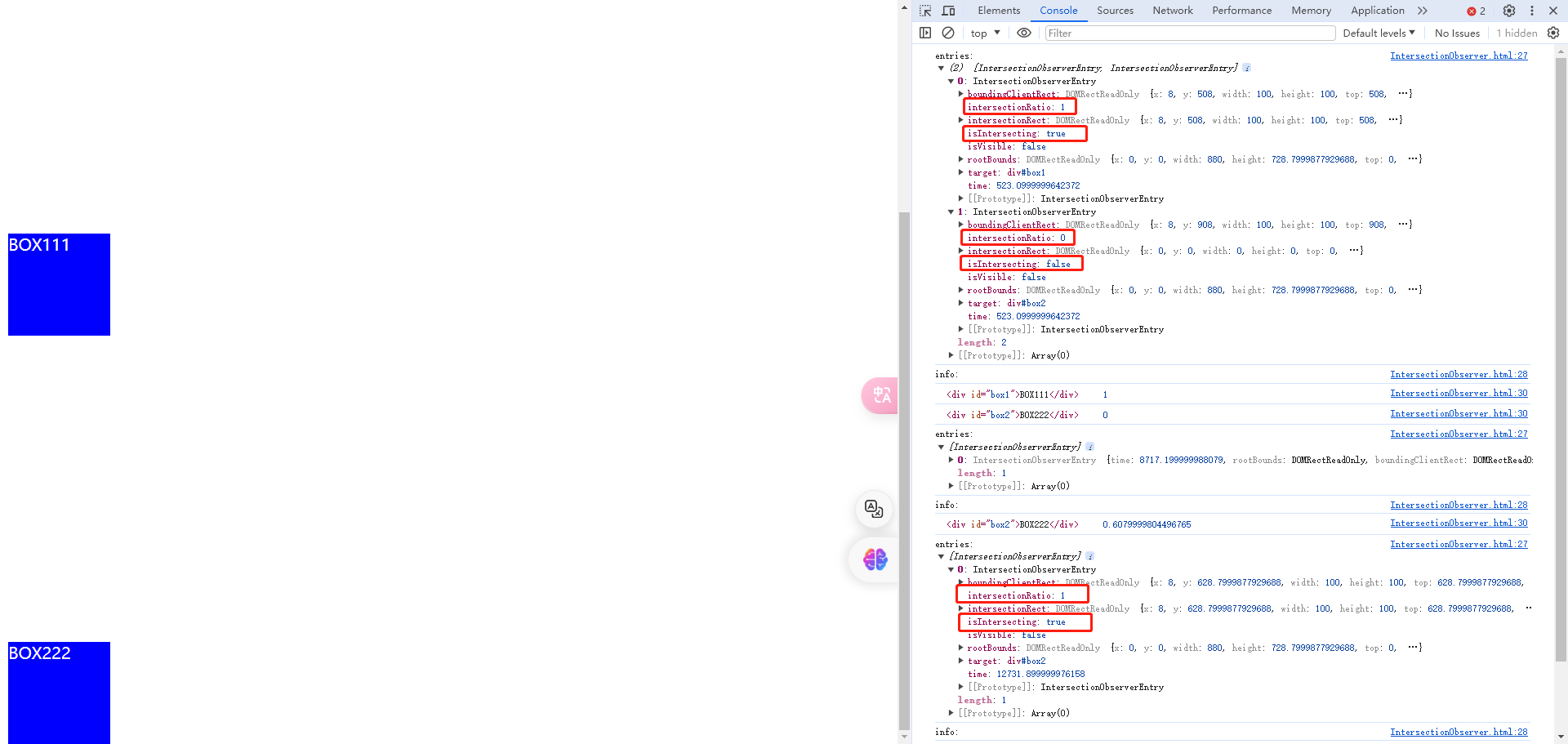
MutationObserver
<!DOCTYPE html>
<html>
<head>
    <style>
         #box {
            width: 100px;
            height: 100px;
            background: blue;

            position: relative;
        }
    </style>
</head>
<body>
    <div id="box"><button>harrison</button></div>

    <script>
        const box = document.getElementById('box');

        const mutationObserver = new MutationObserver((mutationsList) => {
            console.log(mutationsList)
        });

        mutationObserver.observe(box, {
            attributes: true,
            childList: true
        });

        setTimeout(() => {
            box.style.background = 'red';
        },2000);

        setTimeout(() => {
            const dom = document.createElement('button');
            dom.textContent = '木木木';
            box.appendChild(dom);
        },3000);

        setTimeout(() => {
           document.querySelectorAll('button')[0].remove();
        },5000);
    </script>
</body>
</html>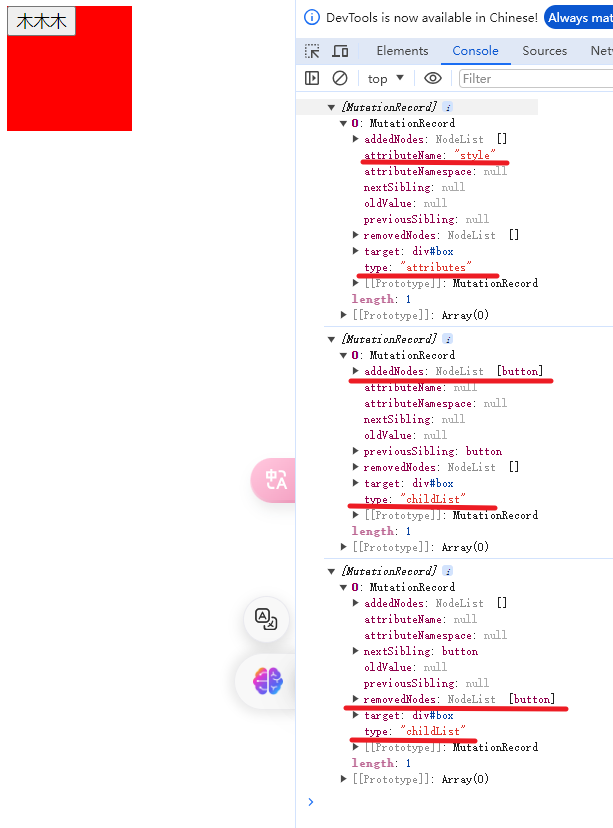
ResizeObserver
ResizeObserver 是一个用于监听元素尺寸变化的 Web API,它提供了一种高效的方式来响应元素大小的变化。
<!DOCTYPE html>
<html lang="en">
    <head>
        <meta charset="UTF-8">
        <meta name="viewport" content="width=device-width, initial-scale=1.0">
        <title>Document</title>
    </head>
    <style>
    #box {
        width: 100px;
        height: 100px;
        background: blue;
    }

</style>
    <body>
        <div id="box"></div>
        <script>
        const box = document.querySelector('#box');

        setTimeout(() => {
            box.style.width = '200px';
        }, 3000);

        const resizeObserver = new ResizeObserver(entries => {
            console.log('当前大小', entries)
        });
        resizeObserver.observe(box);

    </script>
    </body>
</html>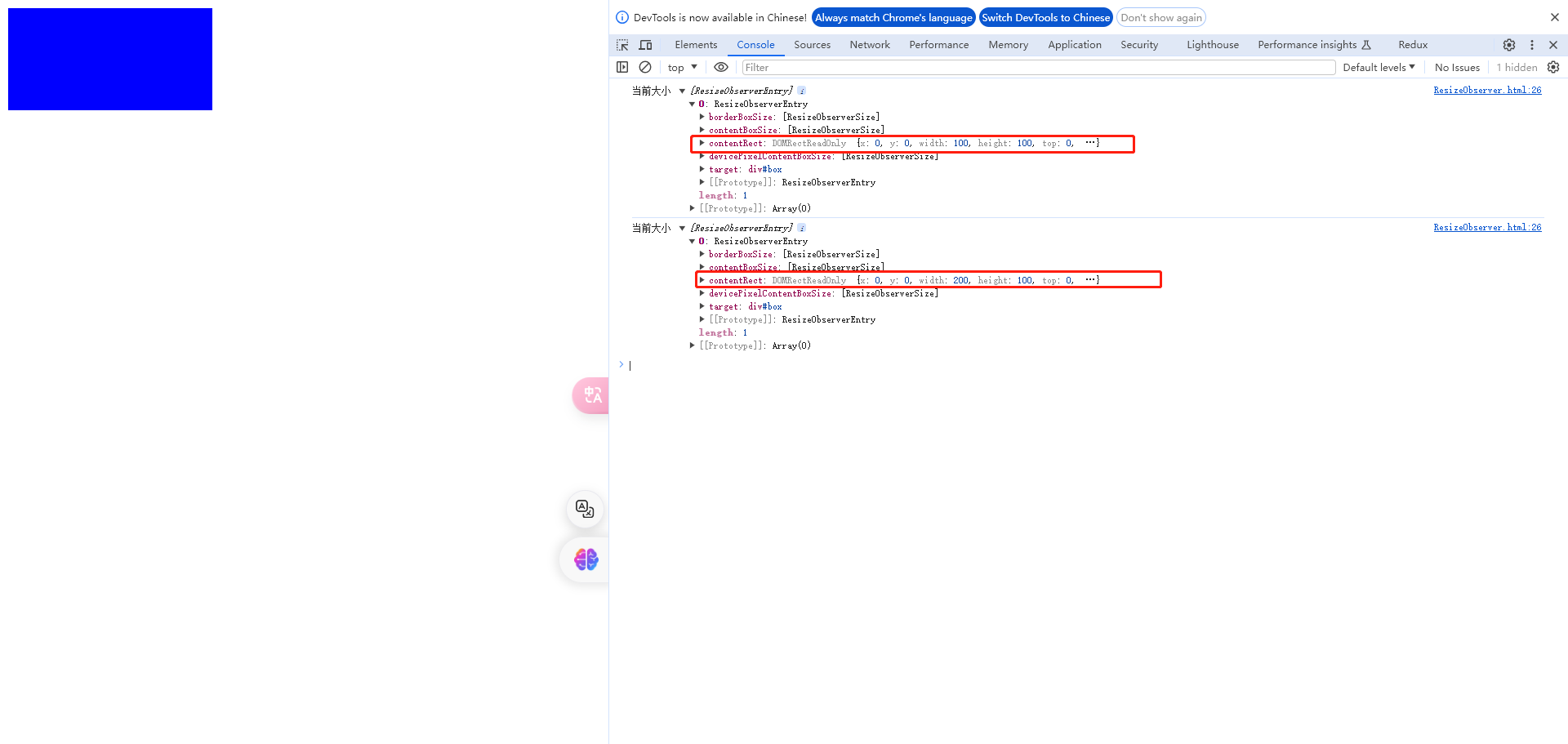
PerformanceObserver
可以使用 performance.mark() 和 performance.measure() 来测量代码执行时间,比如测量页面加载时间、动画持续时间或用户交互响应时间。
<!DOCTYPE html>
<html lang="en">
<head>
    <meta charset="UTF-8">
    <meta name="viewport" content="width=device-width, initial-scale=1.0">
    <title>Document</title>
</head>
<body>
    <button onclick="measureClick()">Measure</button>

    <img src="https://p9-passport.byteacctimg.com/img/user-avatar/4e9e751e2b32fb8afbbf559a296ccbf2~300x300.image" />

    <script>
      const performanceObserver = new PerformanceObserver(list => {
        list.getEntries().forEach(entry => {
          console.log(entry);// 上报
        })
      });
      performanceObserver.observe({entryTypes: ['resource', 'mark', 'measure']});

      performance.mark('registered-observer');

      function measureClick() {
        performance.measure('button clicked');
      }
    </script>
  </body>
</html>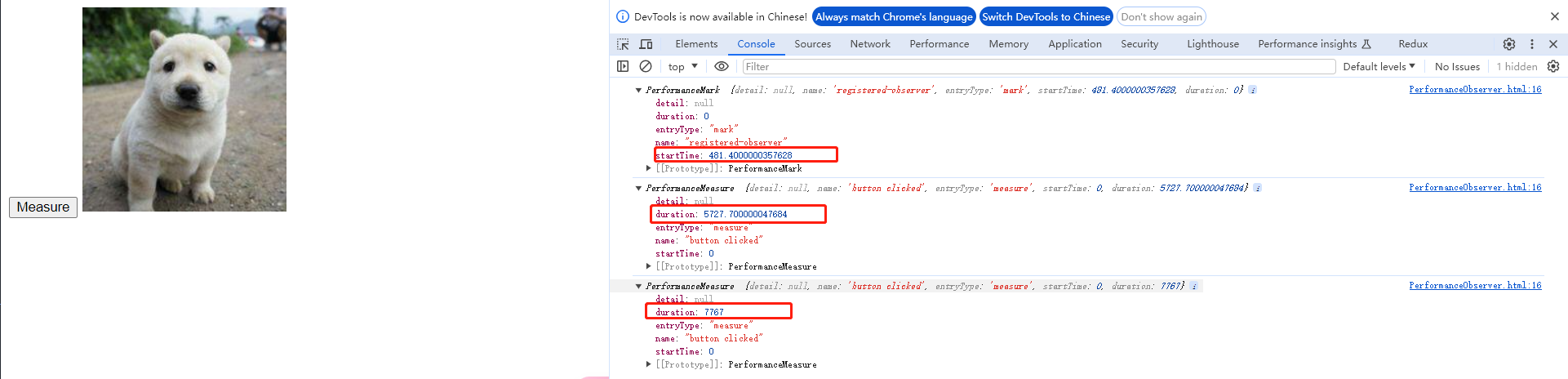
ReportingObserver
ReportingObserver 可以监听过时的 api、浏览器干预等报告等的打印,在回调里上报,这些是错误监听无法监听到但对了解网页运行情况很有用的数据
<!DOCTYPE html>
<html lang="en">
    <head>
        <meta charset="UTF-8">
        <meta name="viewport" content="width=device-width, initial-scale=1.0">
        <title>Document</title>
    </head>
    <body>
        <script>
            const reportingObserver = new ReportingObserver((reports, observer) => {
                for (const report of reports) {
                    console.log(report.body);//上报
                }
            }, {types: ['intervention', 'deprecation']});

            reportingObserver.observe();
    </script>
    </body>
</html>